


![shaftwhores only by [EXE]dann](/files/avatars/2007/51852-shaftwhore.gif "shaftwhores only by [EXE]dann")


It is immediately apparent that the DeathAdder has the exact same bodyshape as the Microsoft Habu. This is unsuprising since the Habu was built as a joint effort between Microsoft and Razer. The body is a sleek and ergonomic right-handed sweep, owing much to the popular shape of the Microsoft Intellimouse Explorer 3.0. For anyone that has used the slug-like shape of the Intellimouse, the DeathAdder should be instantly comfortable. Those that didn't like the Copperhead or Diamondback body shape should take a second look at this new mouse.
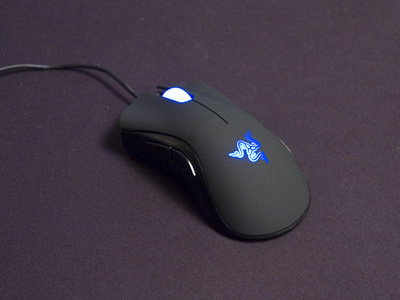
The Razer DeathAdder
Unlike the Habu, Razer have gone for simple and elegant lines. Where the rubberised buttons of the Habu end half-way down the mouse body, the entire top of the DeathAdder is made from one flowing rubberised sheet, split at the front to form the two main buttons. The side and base of the mouse are made from a glossy black plastic. The DeathAdder does not have the glowing fins that are so prominent on the Diamondback, Krait, Copperhead and Habu models. Instead the glow is focused on the mouse wheel which remains solidly lit, and the Razer logo at the back of the mouse that pulses pleasingly. In a way, the DeathAdder's "less" works better than the Habu "more". Put them side-by-side and you can't help but prefer the DeathAdder's simplicity and elegance.
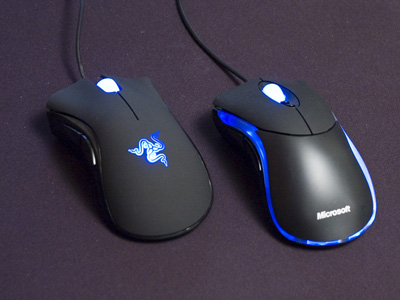
DeathAdder vs HabuDeathAdder Drivers and Software
I was pleasantly suprised by the lack of problems setting up the DeathAdder. With the many complaints I've read about the Habu I was wondering if installing the mouse might take all day. Infact it was just a case of plugging it in, inserting the driver cd, and following the on-screen instructions.
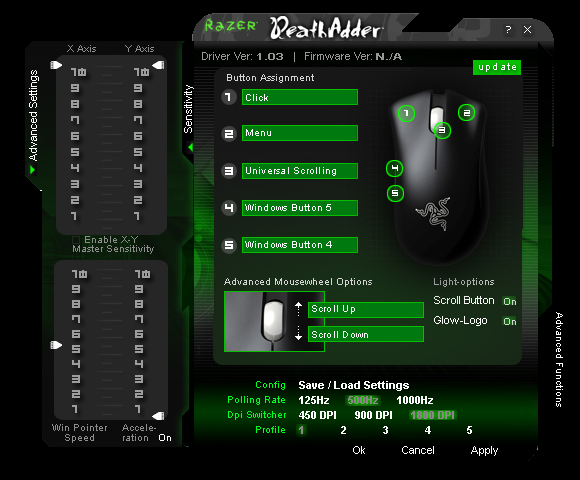
DeathAdder Software
The drivers let you adjust the polling rate and resolution on the five different preset profiles stored on the mouse. You can adjust the X and Y axis sensitivity independently using the advanced settings, and there is an option of using driver acceleration.
All of the buttons and even the mousewheel up/down movement can be mapped to customised controls.
The Razer DeathAdder
Unlike the Habu, Razer have gone for simple and elegant lines. Where the rubberised buttons of the Habu end half-way down the mouse body, the entire top of the DeathAdder is made from one flowing rubberised sheet, split at the front to form the two main buttons. The side and base of the mouse are made from a glossy black plastic. The DeathAdder does not have the glowing fins that are so prominent on the Diamondback, Krait, Copperhead and Habu models. Instead the glow is focused on the mouse wheel which remains solidly lit, and the Razer logo at the back of the mouse that pulses pleasingly. In a way, the DeathAdder's "less" works better than the Habu "more". Put them side-by-side and you can't help but prefer the DeathAdder's simplicity and elegance.
DeathAdder vs Habu
I was pleasantly suprised by the lack of problems setting up the DeathAdder. With the many complaints I've read about the Habu I was wondering if installing the mouse might take all day. Infact it was just a case of plugging it in, inserting the driver cd, and following the on-screen instructions.
DeathAdder Software
The drivers let you adjust the polling rate and resolution on the five different preset profiles stored on the mouse. You can adjust the X and Y axis sensitivity independently using the advanced settings, and there is an option of using driver acceleration.
All of the buttons and even the mousewheel up/down movement can be mapped to customised controls.